
Office 365 vs Office 2021 (2026 Review): Which One Should You Buy?

Callum specializes in breaking down complex technology topics into easy-to-understand guides. He has a background in computer science and technical writing.
Here's a question I get asked constantly: "Should I pay for Microsoft 365 every month, or just buy Office 2021 once and be done with it?" It's a fair question—and honestly, the answer isn't the same for everyone. Let me walk you through what I've learned after helping dozens of people make this decision.
Look, Microsoft really wants you on that subscription train. They've poured AI features, cloud storage, and constant updates into Microsoft 365 to make it irresistible. But Office 2021? It's still out there, quietly doing its job without asking for your credit card every month. Both have their place, and by the end of this, you'll know exactly which one fits your life.
I'm going to cover everything from the cold, hard numbers on pricing to the features that actually matter in day-to-day use. No marketing fluff—just practical advice based on how real people actually use these tools.
📋 What We'll Cover
What's the Actual Difference?
Before we get into the weeds, let's make sure we're on the same page about what we're comparing here.
Microsoft 365 (The Subscription One)
Microsoft 365—which used to be called Office 365 before Microsoft decided to rebrand everything—is Microsoft's cloud-first productivity suite. You pay monthly or yearly, and in return you get the latest version of Word, Excel, PowerPoint, and Outlook, plus a bunch of cloud features.
Always Connected
OneDrive gives you 1TB of cloud storage. Your files sync across devices automatically. Pretty handy if you work from multiple computers.
AI Features (Copilot)
Microsoft's AI assistant is baked into Word, Excel, and the other apps. It can help with writing, data analysis, and presentations. This is exclusive to the subscription.
Constant Updates
New features roll out monthly. You're always on the latest version without having to think about it.
Family Sharing
The Family plan covers up to 6 people. Each person gets their own 1TB of storage. If you've got a household of Office users, this can actually make sense financially.
Office 2021 (Buy It Once, Own It Forever)
Office 2021 is the traditional model: you pay once, you download it, and it's yours. No monthly fees, no subscription to cancel, no worrying about what happens if you forget to update your credit card.
Works Offline
No internet? No problem. Once it's installed and activated, it works completely offline. Great if you're in an area with spotty connectivity.
One-Time Payment
Pay once and you're done. No more monthly charges showing up on your bank statement. The savings add up fast compared to a subscription.
Security Updates Until 2031
Microsoft keeps patching security vulnerabilities until October 2031. That's years of protected use from a single purchase.
What You See Is What You Get
The features you get at purchase are the features you keep. No AI bells and whistles, but also no surprises. Some people actually prefer this stability.
What's Changed Lately
A few things worth noting if you're making this decision in 2026:
- The AI gap is widening: Microsoft keeps adding Copilot features to 365, while Office 2021 stays static. If AI productivity tools are your thing, this matters.
- Office 2024 launched: But honestly, Office 2021 is still perfectly capable for most people—and it's cheaper since the newer version is out.
- Subscription prices crept up: Microsoft 365 has gotten slightly more expensive, which makes the one-time purchase look even better from a pure value standpoint.
- Support continues: Office 2021 isn't going anywhere. Security updates run through 2031, so you're covered for years.
Let's Talk Money
This is where things get interesting. Let me break down the actual numbers so you can see what you're really paying over time.
The Real Cost Comparison
Here's a simple table showing what each option costs over 5 years:
| Option | Annual Cost | 5-Year Total |
|---|---|---|
| Microsoft 365 Personal | $99.99/year | $499.95 |
| Microsoft 365 Family | $129.99/year | $649.95 |
| Office 2021 (Microsoft Store) | $439.99 one-time | $439.99 |
| Office 2021 (Prise Keys) ⭐ | $48.88 one-time | $48.88 |
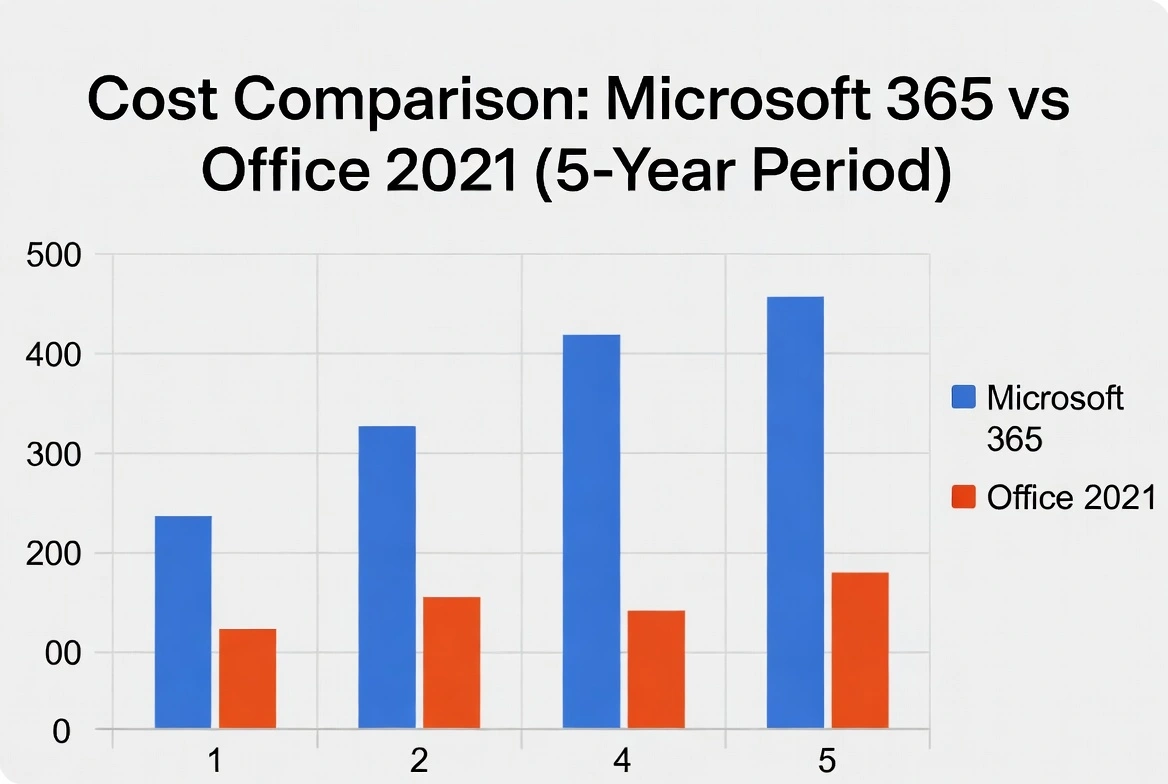
See that bottom row? That's the game-changer. When you get Office 2021 from an authorized reseller, you're looking at savings of over $450 compared to just a few years of Microsoft 365. The math isn't even close.
Ownership vs. Renting
Here's the thing that bothers a lot of people about subscriptions: you're basically renting software. Stop paying, and you can only view your documents—no editing. With Office 2021, the license is yours permanently. Even if Microsoft stops selling it tomorrow, your copy keeps working.
Cloud vs. Local: What Actually Matters
This is where your workflow really comes into play:
Why Microsoft 365 Cloud Works
- 1TB OneDrive storage per user
- Edit documents with coworkers in real-time
- Access files from any device, anywhere
- Automatic version history (lifesaver for mistakes)
Why Office 2021 Offline Works
- Works perfectly without internet
- No subscription means no dependency
- Complete control over your files
- More privacy—nothing synced to the cloud
Who Should Pick What?
After talking to a lot of people about this, here's how I'd break it down:
Office 2021 is probably your best bet if:
- You're tired of subscription fees eating into your budget
- Your internet isn't always reliable
- You don't care about having the latest AI features
- You like actually owning the software you use
- You want to save serious money long-term
Microsoft 365 makes more sense if:
- You need cloud storage and real-time collaboration for work
- The AI tools (Copilot) would genuinely help your productivity
- You have family members who also need Office (the Family plan is decent value)
- Your job requires always having the latest features
- You switch between devices constantly
Why One-Time Purchases Aren't Going Away
Microsoft keeps pushing subscriptions, but there's a reason people keep buying perpetual licenses:
- Subscription fatigue is real: Between Netflix, Spotify, cloud storage, and everything else, people are sick of monthly fees
- The value is obvious: If you keep software for 3+ years (and most people do), paying once saves money
- Office 2021 does everything most people need: Let's be honest—how many people actually use cutting-edge spreadsheet features?
- Prices have dropped: With Office 2024 out, you can get 2021 for a fraction of what it cost originally
Feature-by-Feature Breakdown
Here's a quick reference if you want to compare specific features side by side:
| Feature | Microsoft 365 | Office 2021 |
|---|---|---|
| Apps Included | Word, Excel, PowerPoint, Outlook, OneNote, Publisher, Access + Teams, OneDrive | Word, Excel, PowerPoint, Outlook, OneNote, Publisher, Access (Pro Plus version) |
| AI Assistant (Copilot) | Yes, fully integrated | Nope |
| Cloud Storage | 1TB OneDrive per user | Not included (use whatever you want) |
| Updates | New features monthly | Security fixes only (until 2031) |
| License Type | Subscription (pay forever) | Perpetual (pay once) |
| Devices | 5 devices per user (6 users on Family) | 1 PC or Mac |
| Business Tools | Admin controls, compliance, Teams built-in | Standard business features |
| Works Offline | Kind of (needs to check in periodically) | Completely offline after activation |
| Real-time Collaboration | Full co-authoring | Limited (through OneDrive web) |
| What You'll Pay | $99.99-$129.99/year, every year | From $48.88, once |
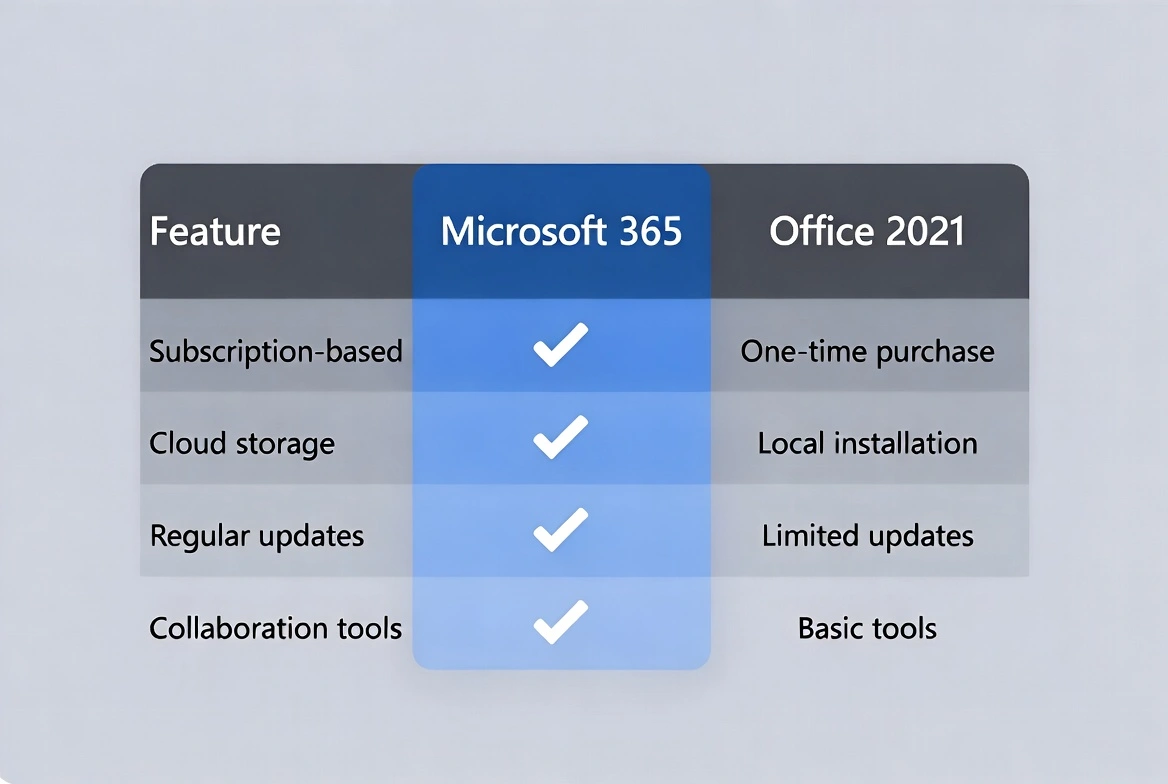
The trade-offs are pretty clear: Microsoft 365 gives you more features and flexibility, but you pay for it forever. Office 2021 gives you the core tools you actually use, and then you're done paying.
Business vs. Home Use: What's the Difference?
Your use case matters here. What works for a freelancer might not work for a 50-person company, and vice versa.
What Business Users Care About
If you're running a business, there are some specific considerations:
Admin Controls
Microsoft 365 Business lets IT manage users centrally, deploy software across the org, and handle compliance. Office 2021 is more "install it yourself."
Team Collaboration
Teams is bundled with Microsoft 365. If your company lives in video calls and chat, this is built right in. Office 2021 doesn't include Teams (though it's free separately).
Security Features
Business 365 plans include data loss prevention, advanced threat protection, and compliance tools. These aren't in the home versions.
Commercial Licensing
Both Microsoft 365 Business and Office 2021 Professional Plus include commercial use rights. The Personal and Family plans are technically for personal use only.

A Note on Licensing
This trips people up sometimes:
- Microsoft 365 Personal/Family: Meant for personal use. Technically shouldn't be used for commercial work.
- Microsoft 365 Business: Commercial license included, plus admin features.
- Office 2021 Home & Business: Licensed for both personal and commercial use.
- Office 2021 Professional Plus: Full commercial licensing, all apps included.
For Home Users
If you're just using Office at home, the priorities are different:
- Basic document work: Both versions handle Word docs, spreadsheets, and presentations identically for everyday tasks.
- Email: Outlook works the same in both.
- Family sharing: Microsoft 365 Family covers 6 people; Office 2021 is one device per license.
- Budget: If money matters, the one-time purchase is usually the winner for home users.
When Microsoft 365 Makes Sense for Business
Consider the subscription if your business:
- Has 5+ employees who need to collaborate on documents
- Requires enterprise-grade security and compliance
- Wants centralized IT management
- Uses Teams heavily for communication
- Wants AI productivity tools for the whole team
When Office 2021 Makes Sense for Business
The perpetual license often works better when you:
- Have a small team (1-5 people) working independently
- Want predictable costs without ongoing fees
- Already have cloud storage through another provider
- Prefer owning your software assets outright
- Don't need the latest features—just reliable tools
How to Install and Activate
Whichever version you go with, here's how to get it up and running.
Installing Office 2021
Once you've got your product key, here's what to do:
Office 2021 Installation Steps
- 1Go to Microsoft's setup page: Open your browser and head to
setup.office.com. - 2Sign in: Use your Microsoft account. Don't have one? Create a free account—it only takes a minute.
- 3Enter your product key: It's the 25-character code from your purchase (looks like XXXXX-XXXXX-XXXXX-XXXXX-XXXXX).
- 4Download: Click "Install Office" and save the installer file.
- 5Run the installer: Double-click the downloaded file and follow the prompts. Takes about 10-15 minutes.
- 6Activate: Open Word (or any Office app), sign in when asked, and you're done.
Installing Microsoft 365
For the subscription version:
Microsoft 365 Installation Steps
- 1Sign in to your Microsoft account: Visit
account.microsoft.com. - 2Redeem your subscription key (if you bought one), or set up your payment method for ongoing billing.
- 3Go to the Services & Subscriptions page and click "Install" next to Microsoft 365.
- 4Run the installer and let it do its thing.
- 5Sign in when prompted and you're all set. OneDrive will start syncing automatically.
Quick tip:
Don't try to install both Microsoft 365 and Office 2021 on the same computer. They don't play nice together and you'll end up with activation headaches. Pick one.
Where to Buy Office 2021 Safely
This is important—there are a lot of sketchy sellers out there. Here are the options I'd actually recommend:
1. Prise Keys (Best Value)
2. Microsoft Store (Full Price)
The official option
- Price: $439.99 (Professional) or $249.99 (Home & Business)
- Delivery: Digital download
- What's good: Directly from Microsoft, no questions about legitimacy
- The catch: You're paying 10x more than through resellers
3. Major Retailers (Variable Pricing)
Amazon, Best Buy, etc.
- Price: $200-400 depending on sales
- Delivery: Digital or physical box
- What's good: Trusted sellers, easy returns
- The catch: Still significantly more expensive than authorized resellers
Sellers to Avoid
Red flags
- • Prices under $10 (likely pirated or stolen keys)
- • eBay sellers without verified track records
- • Websites with no contact information or support
- • Anyone asking you to download "activators"
- • Sellers using PayPal as "friends and family"
Common Problems and How to Fix Them
These are the issues I see people run into most often:
"This product key didn't work"
What's happening
Most likely the key was already redeemed, or you're entering it incorrectly.
Try this:
- 1. Check if you accidentally used a different email when you redeemed it
- 2. Log into account.microsoft.com and look under Services & Subscriptions
- 3. If it's not there, contact the seller with your purchase receipt—legitimate sellers will help
"We couldn't link this product to your account"
What's happening
Usually a browser or connection issue, not a key problem.
Try this:
- 1. Clear your browser cookies and cache
- 2. Try a different browser (Edge often works best with Microsoft stuff, go figure)
- 3. Make sure your Microsoft account email is verified
- 4. Turn off VPN if you're using one
- 5. Wait a few hours and try again—sometimes it's just server issues
"Your subscription has expired"
What's happening
Your Microsoft 365 payment failed or the subscription ended.
Try this:
- 1. Check your payment method in your Microsoft account
- 2. Update your credit card if it expired
- 3. Renew your subscription—or switch to Office 2021 to avoid this happening again
- 4. Your files aren't gone, they're just read-only until you renew
"Office couldn't activate"
What's happening
The activation process is failing for some reason.
Try this:
- 1. Check your internet connection
- 2. Run Office as Administrator (right-click, "Run as administrator")
- 3. Download Microsoft's Support and Recovery Assistant tool—it fixes most issues
- 4. Make sure Windows is fully updated
- 5. Temporarily disable your firewall during activation
Installed the wrong version
What's happening
You've got Office 2021 and Microsoft 365 fighting with each other, or the wrong version installed.
Try this:
- 1. Download Microsoft's official Office removal tool (search "Microsoft Office uninstall tool")
- 2. Uninstall everything completely
- 3. Restart your computer
- 4. Install the version you actually want
- 5. Don't install both on the same machine!
Frequently Asked Questions
Here are the questions I hear most often:
Is Office 2021 still worth it in 2026?
Absolutely. It does everything most people need—Word, Excel, PowerPoint, Outlook—and security updates continue until 2031. At the prices you can get it now, it's actually a better deal than when it first came out.
Should students get the subscription?
Check if your school offers Microsoft 365 for free first—many do through your .edu email. If not, the one-time purchase usually makes more sense. You'll use it for 4+ years of college, so why keep paying?
Which is cheaper over time?
Office 2021, and it's not even close. At $48.88, it costs less than half a year of Microsoft 365 Personal. Over 5 years, you could save $400+.
Can I use Office 2021 completely offline?
Yes. After you activate it once (which requires internet), it works forever without any connection. Great for anyone with unreliable internet or privacy concerns.
Can I upgrade from 2021 to 2024 later?
You'd need to buy a new license—there's no free upgrade. But honestly, Office 2021 keeps working perfectly, and with security updates until 2031, there's no rush to upgrade.
Do both versions include Outlook?
Yes, the Professional Plus editions of both include Outlook. The functionality is nearly identical for everyday email use.
Does Office 2021 work on Mac?
Yes, there's a Mac version called Office 2021 Home & Business for Mac. It has native macOS apps.
Are the keys from resellers legitimate?
From authorized resellers like us, yes. These are genuine Microsoft licenses—often retail or volume keys purchased in bulk. The activation is official and permanent. Just avoid the ultra-cheap grey market sellers.
What happens if my 365 subscription lapses?
Your files stay in OneDrive and you can download them, but Office apps go read-only—you can view but not edit. This is why some people switch to the one-time purchase after getting burned.
Can I install Office 2021 on multiple computers?
Standard licenses are for one PC. If you need it on multiple machines, you'd need multiple licenses. Microsoft 365 lets you install on 5 devices per user, which is one of its advantages.
Does Office 2021 include Teams?
No, but Teams is available as a free standalone download anyway. Microsoft 365 bundles it, but you're not missing out if you go with the one-time purchase.
Which is better for a small business?
If you're 1-5 people working fairly independently, Office 2021 Professional Plus often makes more sense. Once you get to larger teams that need collaboration and IT management, 365 Business becomes worth considering.
Will Office 2021 ever get AI features?
No, Copilot is subscription-only. Microsoft wants you on the recurring revenue train for the fancy stuff. Whether you actually need AI features is a different question.
Can I switch from 365 to Office 2021?
Definitely. Cancel your 365 subscription, uninstall it, install Office 2021, and you're done. Your documents stay compatible. A lot of people make this switch after subscription fatigue sets in.
Is there a free trial?
Microsoft offers a 1-month free trial of Microsoft 365. Office 2021 doesn't have a trial, but at $48.88, the cost is low enough that it's not a huge risk.
The Bottom Line
After everything I've covered, here's my honest take on who should buy what:
For most home users and small businesses, Office 2021 is the smarter financial choice. You get professional-grade tools, you pay once, and you're done. The people who genuinely benefit from Microsoft 365 are those who really use the cloud features and collaboration tools daily—not just theoretically want them.