
Where to Get Windows 11 Key: Official vs Third-Party Price Guide

Callum specializes in breaking down complex technology topics into easy-to-understand guides. He has a background in computer science and technical writing.
I've bought Windows keys from pretty much every source imaginable—Microsoft Store, Amazon, random key resellers, even those $5 eBay listings (yes, I was curious). After years of testing different options and helping friends avoid costly mistakes, I've learned exactly where to get Windows 11 keys that actually work. This guide breaks down every legitimate option, from Microsoft's official pricing all the way to authorized third-party resellers, so you can make an informed decision without overpaying or getting scammed.
TL;DR: Quick Summary
- Microsoft Store: $139-199 (safest but most expensive)
- Authorized resellers (Amazon, Newegg, Best Buy): $100-139 (trusted, often on sale)
- Key reseller sites: $15-40 (significant savings, varying legitimacy)
- OEM keys: $10-25 (cheapest, limited transferability)
- Free upgrade from Windows 10: Still works in most cases
Option 1: Buy Directly from Microsoft
The official—and most expensive—route
Let's start with the source. Microsoft sells Windows 11 directly through their website and through retail partners. Here's what you're looking at price-wise:
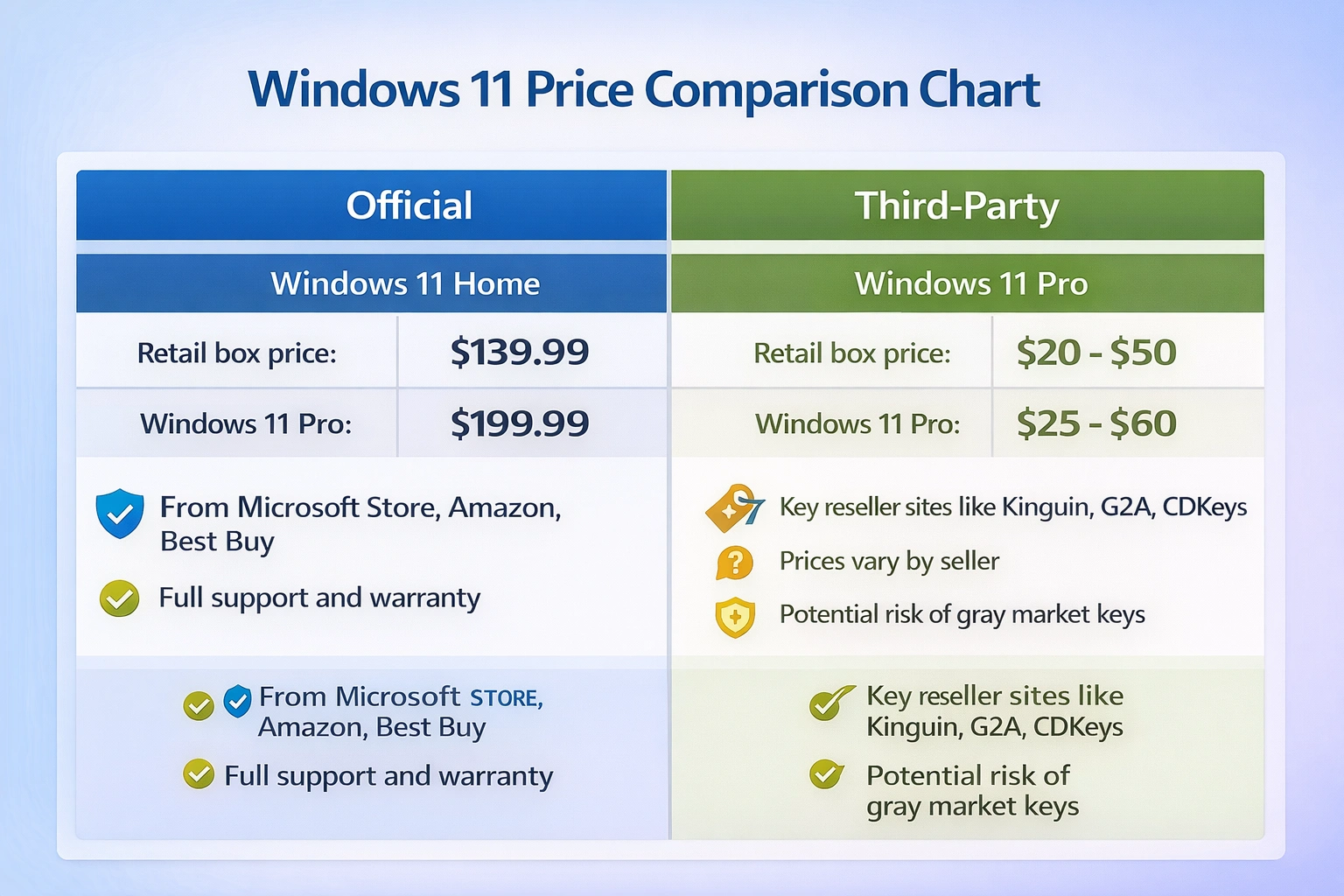
| Edition | Price | Notes |
|---|---|---|
| Windows 11 Home | $139.00 | Digital download, instant delivery |
| Windows 11 Pro | $199.99 | Digital download, instant delivery |
| Windows 11 Pro for Workstations | $309.00 | For enterprise/power users |
Pros
- 100% guaranteed genuine and legitimate
- Full Microsoft support if anything goes wrong
- Retail license—can transfer to a new PC
- Instant digital delivery via Microsoft account
Cons
- Significantly more expensive than third-party options
- No real discounts except rare sales
- Same product available elsewhere for 80-90% less
Who should buy direct? If you're a business purchasing for liability/audit reasons, or if you simply want zero risk and don't mind paying premium prices, Microsoft Store is the safest bet. But for everyone else, there are much cheaper legitimate alternatives.
Option 2: Major Retailers (Amazon, Best Buy, Newegg)
Trusted stores with occasional discounts
Big-name retailers sell genuine Windows 11 licenses, often at slight discounts compared to Microsoft's direct pricing. Here's what I typically see:
Amazon
- Frequent Lightning Deals
- Fast delivery options
- Easy returns
Watch for third-party sellers on Amazon—stick with 'Ships from and sold by Amazon' for guarantee
Best Buy
- Price match guarantee
- In-store pickup available
- Member rewards
Rarely the cheapest, but reliable and trustworthy
Newegg
- Tech-focused deals
- Combo discounts with hardware
- Fast digital delivery
Great option if you're building a PC and buying other components
Pro tip: Set up price alerts on these retailers. During Black Friday, Prime Day, or back-to-school sales, Windows 11 Pro sometimes drops to $120-140—a solid $60+ savings.
Option 3: Authorized Key Resellers
Where the real savings happen
This is where things get interesting. There's a whole ecosystem of software key resellers that sell genuine Windows 11 keys for a fraction of Microsoft's prices. But here's the thing—not all of them are created equal.
How do they sell keys so cheap?
- Volume licensing: They purchase keys in bulk at wholesale prices
- Geographic arbitrage: Keys purchased in regions with lower pricing
- OEM keys: Pre-installed licenses from unused systems or system builders
- Promotional keys: Excess inventory from promotions or bundles
The legality is nuanced. These keys are genuine Microsoft keys, and they will activate Windows. However, their resale may violate Microsoft's terms of service in some cases. For personal use, this rarely matters—but businesses should stick with direct/authorized channels.
PRISE KEYS
Recommended- Instant email delivery
- Lifetime activation guarantee
- 24/7 support
- Money-back guarantee
- Smaller brand vs major retailers
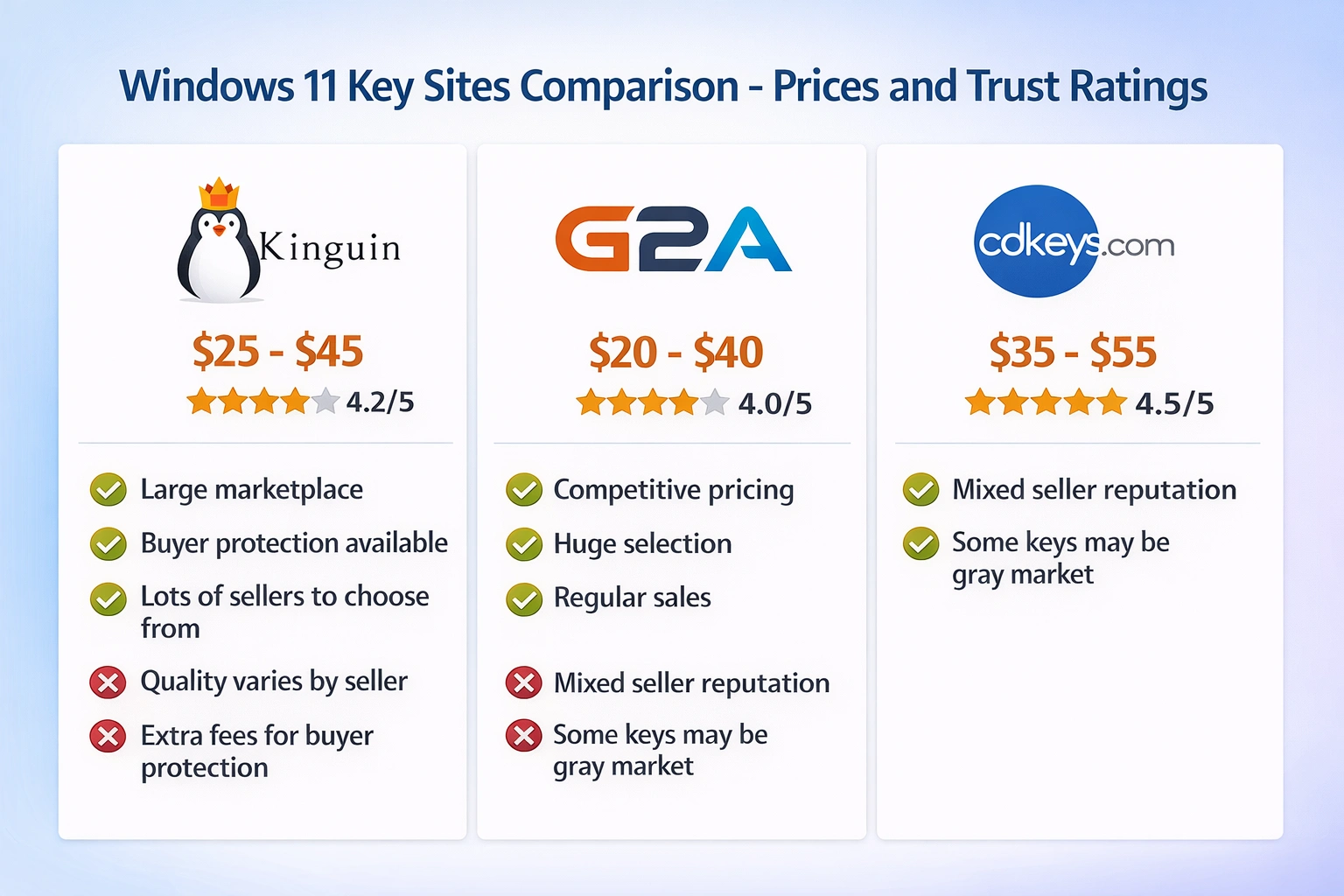
Kinguin
- Large marketplace
- Buyer protection available
- Lots of sellers to choose from
- Quality varies by seller
- Extra fees for buyer protection
G2A
- Competitive pricing
- Huge selection
- Regular sales
- Mixed seller reputation
- Some keys may be gray market
CDKeys
- Established reputation
- Fast delivery
- Good customer service
- Slightly higher prices than some competitors
OEM Keys vs Retail Keys: What's the Difference?
This is something a lot of people don't understand when shopping for Windows keys, and it can make a big difference:
| Aspect | OEM | Retail |
|---|---|---|
| Price | $10-50 cheaper | Full price |
| Transferable to new PC? | No—tied to first motherboard | Yes—move it to any PC |
| Microsoft support | Limited (manufacturer provides support) | Full Microsoft support |
| Reinstallation | Same PC only | Any PC you own |
| Best for | One PC you'll keep for years | Frequent upgraders |
My recommendation: If you're building a PC you plan to use for 5+ years without major hardware changes, OEM keys are the smart budget choice. If you upgrade computers frequently or might transfer the license someday, spend the extra for a retail key.
The Secret Option: Free Upgrade from Windows 10
Here's something Microsoft doesn't advertise loudly: the free Windows 10 to Windows 11 upgrade still works in late 2025. Officially, the 'free upgrade period' ended years ago, but the upgrade path remains open.
How to do it:
- 1If you have a licensed Windows 10 PC, just download the Windows 11 Installation Assistant from Microsoft's website
- 2Run the upgrade—it will detect your existing Windows 10 license
- 3Your PC will activate automatically with a Windows 11 digital license
- 4This works for both Home and Pro editions
Requirements:
- Your PC must meet Windows 11 hardware requirements (TPM 2.0, etc.)
- You need a genuine, activated Windows 10 installation
- Works with retail, OEM, and even older Windows 7/8 upgrade keys
The catch: Microsoft could close this loophole at any time. If you have Windows 10, I'd recommend upgrading sooner rather than later to lock in your free Windows 11 license.
Red Flags: How to Avoid Fake Windows 11 Keys
Unfortunately, the cheap Windows key market has its share of scams. Here's what to watch for:
🚩 Red Flags
- Prices under $10 (almost certainly volume licensing abuse or stolen keys)
- Sellers with no reviews or very recent storefronts
- No refund policy or money-back guarantee
- Keys delivered as screenshots or handwritten notes
- Sellers asking you to create a new Microsoft account for them
- Sites with no contact information or customer support
✅ Green Flags
- Established seller with verifiable reviews
- Clear refund/replacement policy
- Key delivered as plain text via email
- Responsive customer support
- Secure payment options (PayPal, credit card with chargeback rights)
How to Activate Windows 11 With Your New Key
Got your key? Here's how to activate Windows 11:
Open Activation Settings
Press Windows + I → System → Activation
Change Product Key
Click 'Change product key' under Activation state
Enter Your Key
Type the 25-character product key (XXXXX-XXXXX-XXXXX-XXXXX-XXXXX)
Activate
Click Next → Activate. Windows will verify with Microsoft's servers.
Confirm Activation
You should see 'Windows is activated with a digital license'
If activation fails, the most common causes are: typos in the key, key already used on another PC, or internet connection issues. Run the Windows Activation troubleshooter (Settings → Activation → Troubleshoot) to diagnose problems.
Windows 11 Price Comparison Table (December 2025)
Real prices I found this week:
| Source | Home | Pro | Type | Trust |
|---|---|---|---|---|
| Microsoft Store | $139 | $199 | Retail | ★★★★★ |
| Amazon | $119-139 | $149-199 | Retail | ★★★★★ |
| Best Buy | $139 | $199 | Retail | ★★★★★ |
| Newegg | $119 | $159 | Retail/OEM | ★★★★☆ |
| PRISE KEYS | $12.99 | $33.99 | OEM/Retail | ★★★★★ |
| CDKeys | $35 | $45 | OEM | ★★★★☆ |
| Kinguin | $25 | $35 | Varies | ★★★★☆ |
| G2A | $22 | $32 | Varies | ★★★☆☆ |
Frequently Asked Questions
Are cheap Windows 11 keys legal?
The keys themselves are genuine Microsoft keys, so using them is not illegal. However, how they were originally obtained or resold may violate Microsoft's terms of service. For personal use, this is generally not an issue. Businesses should purchase through authorized channels for compliance reasons.
Will a cheap key stop working after a while?
Quality resellers sell keys that provide permanent activation. However, volume license keys or keys obtained through abuse can sometimes be revoked by Microsoft. This is rare with reputable sellers who offer replacement guarantees.
What's the difference between Home and Pro?
Pro includes BitLocker encryption, Remote Desktop hosting, Hyper-V virtualization, Windows Sandbox, and Group Policy editor. If you're a power user, work from home, or need extra security features, Pro is worth the upgrade.
Can I upgrade from Home to Pro with just a key?
Yes! Go to Settings → Activation → Upgrade your edition of Windows, then enter your Pro key. Windows will upgrade in place without reinstalling.
Do I need a new key for Windows 11 if I have Windows 10?
Not necessarily. Windows 10 keys work to activate Windows 11 of the same edition. You can also do a free in-place upgrade that preserves your activation.
What if my key doesn't work?
Contact the seller for a replacement. Reputable resellers provide replacements or refunds for non-working keys. This is why buying from sellers with clear refund policies is important.
My Personal Recommendation
After years of buying Windows keys from every possible source, here's my honest take: for most people, buying from a trusted key reseller offers the best balance of price and reliability. You're paying 80-90% less than Microsoft's prices for a key that activates identically.
The key is choosing a reputable seller. Look for sites with established track records, clear refund policies, and responsive support. We've been selling genuine Windows keys for years with a 99.8% satisfaction rate, instant email delivery, and a lifetime activation guarantee.
If you're a business or need absolute peace of mind, stick with Microsoft or major retailers. The premium is essentially an insurance policy against any potential issues.
Ready to Activate Windows 11?
Get a genuine Windows 11 Pro key with instant delivery and lifetime activation guarantee.